Mega Cloud’s payroll management system automates payroll processing, ensuring tax compliance, accurate deductions, and seamless employee self-service access—all designed to save your business time and reduce errors.
Mega Cloud’s Payroll Management system automates payroll processing, ensures tax compliance, and provides self-service portals for employees to manage their details. From real-time salary calculations to leave tracking, our solution helps businesses streamline HR operations and reduce manual errors. Get more efficient and compliant today.
Automate payroll, tax calculations, and deductions with ease.
Allow employees to access payslips and manage personal details.
Ensure full tax compliance and accurate deductions for all employees.
Manage employee attendance and leave efficiently with built-in tools.
The all-in-one HRMS software you need to streamline your processes
Why Siora AI Makes a Difference
Managing HR shouldn’t mean wasting hours on manual tasks. With Siora AI, you save time, reduce errors, and get the insights you need instantly.
Need help with something you’re unsure about? Ask your friendly HR colleague Siora. Instead of digging through manuals and menus, you can now find your answer in seconds.
Writing HR letters from scratch slows everything down. Reduce hours of drafting down to seconds, freeing HR staff to focus on higher-value tasks.
Simply ask Siora what you need and it will generate customised formulas unique to your case. Get precise formulas tailored for any payroll needs such as salary, allowance, or deduction rules in seconds.
Scrolling through endless rows of data makes it easy to miss important patterns. Siora highlights key trends, anomalies, and key essential insights at a glance.
Manages both HR and Payroll Seamlessly
Ask, don’t search. Find the right solutions every time with ease, even on holidays.
Get a professionally written HR document or email in seconds. No more writer’s block.
Remove the guesswork. Ask Siora AI for accurate payroll formulas every time and avoid costly mistakes.
Import done right the first time. Get fast, accurate, and compliance-ready records and formats instantly.
No more manually filtering reports or building custom queries. Siora provides on-demand, precise reports like “How many staff were absent last month?”
Don’t miss anything! Get the big picture and see essential insights at a glance. Spot issues early with ease on attendance patterns, abnormalities and more.
Compliant with all regulatory requirements such as LHDN, KWSP, SOCSO and EIS.
3 simple steps for payroll processing & Instant EA forms generation.
Loan management allowing auto or manual deductions until loan fully paid off.
Supports Electronic Payment and ability for bulk payment for most major banks.
View on app or web portal or send encrypted pay slip via email which only allow access and view with a preset password.
Multiple Payroll Processes, including Claim and commission process, biweekly, along with bonus arrangement.
The auto update feature ensuring reports always compliant to latest regulatory requirement.
All common reports are customizable to suit every organisation.
Export within few clicks, available in common formats including PDF, XLS, CSV, TXT etc.
Extensive filtering can be applied to all reports for data that truly meaningful for each user’s organisation
With more than 10 payslip templates available, while being able to create own designs and layouts.
Supports multiple companies in a single subscription, with ability to restrict access rights.
Automatic & downloadable company Organization Chart
Import eAttendance data when using external devices.
Powerful employee inquiry feature, easily search all related information.
1 click HR Letters, select from our library of templates, or create your own.
Audit logs, keep track of records or monitor changes made by administrators.
Including Pass/Permit expiry for local and foreign employee, confirmation dates or even birthdays.
Store files and additional documents for each individual employee.
Create custom fields to store additional information such as staff T-shirt size or personal preferences.
Self-service available for employees on both Web Portal and Mobile App.
View leave application status and entitlement balance, or documents such as Payslips and EA forms.
Just key in employee’s email to send invitation link.
Make companywide announcements for important notices or offhand update.
A specific storage folder which files saved are to be shared among all staffs, e.g. Employee Handbook or Insurance Scheme details.
Digitally apply & approve leave via Web Portal, Mobile app, and E-mail.
Multiple entitlement groups for different tiers to determine number of leave entitlement days.
Easily track leave balances and application status with approval/rejection details.
Allowing employees to attach accompanying files when applying leave.
View holidays and leave status of employees within the system.
Multi-level approval supported, with no maximum level limitation.
Generate varieties of leave reports for complete details on employees’ leave information.
Conveniently generate complete historical reports and view with one click.
Streamline leave management, reduce transactional workload, and minimize human errors due to manual entry.
Digitally submit & approve of claims via Web Portal, Mobile App and E-mail.
Multiple Entitlement Groups enabling claims management by department or hierarchy.
Easily Track Claim Balances, status and entitlements via web portal or mobile app..
Easily attach receipts, and other relevant documents by capturing images directly or selecting from device’s gallery.
Multi-level approval can be set for better control, with no maximum level limitation.
Complete claim reports and claim amount with historical data.
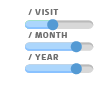
3-tier entitlement that can be configured to limit per receipt, per month, or per year claims.
Clock in on mobiles or clocking devices over the network, no more manual recording or physical punch card.
View and verify every clocking transaction of each clocking sessions.
A solution for both fixed hour employee and employee with flexible work hour contribution.
Easily transfer eAttendance data into AutoCount HRMS for wages and OT calculation.
Supported by various advance technologies to ensure an accurate and foolproof clocking practice.
HRMS FAQs
1. Why Choose AutoCount HRMS?
With more than 20 years of experience and certified by LHDN (Malaysia), AutoCount HRMS is currently serving more than 20,000 companies processing payroll for over 450,000 employees every single month. From our humble on-premises system to the current Cloud HRMS our end goal is to help businesses maximize their efficiency while maintaining accountability, instead of worrying about the mundane repetitive task of processing payroll, business owners can focus on their day-to-day tasks and their employees.
2. Can I get a free trial?
Yes, we do offer a free trial that you can use to evaluate the system. However, we recommend getting in touch with our Sales Team for them to provide you with a detailed explanation of the system and even help you get started more easily. Contact us at sales@autocountsoft.com or WhatsApp us.
3. How to get started?
With AutoCount’s HRMS no technical skills required, nothing to be installed and no servers required, just register an account and you are good to go. We do have a very easy to follow step by step guide available Here.
4. I have a large number of employees, can AutoCount help?
Definitely! We have a dedicated Implementation Team that can be assigned to our clients during the initial stage of setting up the system for a fee. They will ensure that all the setup process goes smoothly while being in close contact with your team. Once the setup is complete and your first payroll process is complete, they will then handover their duties to our Support Specialist to handle your future support needs.
5. What kind of support is available?
We have multiple channels of support that will be available for our users, depending on your preferred contact method which includes Email, Phone and Live Chat. Our support is available during standard business hours from 9am to 6pm (GMT +8), Monday to Friday.
6. I wish to have local support and services, can AutoCount provide such services?
We have an established dealer network and local support in selected area ready to serve our product users.
7. Are there any self learning methods available?
A series of complete Free Training on youtube and quick start guide to assist user on questions met, and steps on each settings. [Video Library]
8. How often is the system updated?
We strive to provide the best possible experience for our users, by providing frequent enhancement cycles with new features or fixes several times each year. The best part is that since this is a cloud-based system it will require our users no effort as the update will automatically be applied with minimal disruption as it is usually done during off-peak hours.
9. What are the contract terms?
We aim to provide flexible contract options to better suit more businesses, we have our Monthly and Annual Subscription. We would recommend getting in touch with our Sales Team for a better understanding of which plans are suitable for your business. Contact us at sales@autocountsoft.com or WhatsApp us.
10. What Kind of plans or packages are available?
We cater to many customers in a variety of sectors, we currently have 3 plans which are Premium, Express and Accountant Plans. Premium Plan- A very modular subscription where users can customize their selection of modules which include our eLeave, eClaim and eAttendance modules suitable for businesses of any size.
Express Plan- Simple and basic plan suitable for SMEs who only need to handle their basic payroll needs like processing payroll, providing payslips and generating reports at a very affordable price.
Accountant Plan- A plan built for registered accountants only, enabling you to handle your client’s payroll needs from the cloud.
1. Do I need to host a server to have access?
No, AutoCount HRMS is already hosted on a secure platform. Users will only require an internet capable device like PC’s or mobile devices to have access to all your HRMS needs.
2. How do I get the mobile app?
The app is available with no additional charges for all employees on your device’s app stores like Google Play, Apple App Store, and Huawei App Gallery, just click on the links or search for “AC Payroll” and download it now.
3. What are the recommended browsers I should use?
We recommend using Google Chrome or Mozilla Firefox for the best experience; however, any other browsers should work fine if they are updated to the latest versions.
4. Will my information be secured on the cloud?
AutoCount is also ISO 27001:2013 Certified, delivering higher degree of safety by implementing strict quality assurance measures and data safety protocols.
5. How is the platform secured?
Never worry of data breach as AutoCount HRMS is hosted in Azure’s data centre, one of the safest cloud environments in the world along with protection by encryption and secure login process with 2 factor authentication process.
6. How to activate 2-Factor Authentication?
Once logged in via the web portal, on the top right corner of the screen click your name and select profile. 2-Factor Authentication can be set up via the profile page, we recommend using Microsoft’s or Google’s Authenticator app.
7. What if I forgot my password?
You will be able to reset your password on the login screen, just select the forgot password option and you will be guided to the password reset process using your registered email address.
8. How are payslips delivered?
Payslips can be delivered via email and mobile app, once payslips are available employee can be notified via the app or email where they can login and view their playslips immediately. You can also schedule the notification for a later date. Email can also include the payslips as attachments, this will also automatically encrypt the files with a password.
9. Are there any file limitations for eLeave & eClaim submissions?
Yes, the file size is limited to 3MB per submission, this size should be sufficient for most submitted file types like PDF, Excel Files and images. For images you can utilize our in app camera to ensure that file size is always within the limit.
10. I have multiple HR’s in my organization, can I limit their access rights?
AutoCount HRMS also comes with Access right controls where user can set dedicated access rights per user, in assuring they only access the data they need.
1. What is HRMS?
HRMS stands for Human Resource Management System, a set of software applications that help HR professionals manage HR functions efficiently. The system aims to reduce manual and repetitive tasks to improve productivity and efficiency by centralizing and automating core HR processes, such as: employee data storage, benefits administration, time and attendance, and payroll.
2. Do I need HRMS for my company?
No matter how small or large HRMS is recommended as business owners can automate and streamline HR tasks, such as payroll, leave management and benefits administration. HRMS can also help small businesses ensure compliance with labor laws, reduce manual workload, and improve decision-making.
3. What features does AutoCount HRMS have?
The main modules that are available are:
4. Will I be able to use a dedicated Time Attendance Device?
We have our iFace Time Attendance device that can be used with our eAttendance Module, the device will be able to automatically sync data to our cloud system, if you wish to learn more about the iFace device do contact our Sales Team for more information.
1. What are the subscription options available?
No additional or hidden charges with flexible billing options, opt for monthly or yearly plan that suits you best.
2. How much does AutoCount HRMS cost?
AutoCount HRMS is charged by based on number of headcounts and modules selected. Enjoy more savings and never pay for more than what you need. Easily check the charges with our online calculator here.
3. What if I need to increase or decrease my employee headcounts during my subscription period?
Upgrades are pro-rated, which enable users to upgrade/downgrade at any time via our self service portal..
4. Will there be any reminders before my subscription/plan expires?
Yes, we will send you reminders via email, 7 days before the expiry of your plan and another email 3 days before the expiry. We will again send a notification via email on the day of expiry and finally 3 days after the expiry.
5. How do I renew the subscription/plan?
You will be able to proceed with the renewal via our subscription portal, if you need assistance our support team will be able to assist you on this. You can also follow this video guide for a step-by-step guide.
6. What happens when my plan expires?
After your subscription expires, you still have access to the system for 3 days. During this grace period, there will be no limitation imposed. However, after 3 days the system will be switched to a limited access mode which only allows you to view data and generate government-related reports.
7. Limited access mode
In this mode, users have restricted capabilities within the system, users can only view information no changes can be made. However, pay slips can be downloaded and report generation is limited to Government Reports such as SOCSO, EPF listings, and EA Forms.
8. Penalty Charges
30 days after the plan expires, a penalty charge will be applied. The penalty amount will be 50% of your next subscription invoice. This charge is only applicable if the renewal is for one month, for renewals more than 1 month there will be no penalty charges.
9. Will I be able to get a Performa Invoice (PI) before making payment?
Yes, the system will automatically generate a PI for your reference 3 days before your plan expires, however you may also generate it anytime via the subscription portal.
10. Where can I request an invoice after making payment?
An invoice will be automatically generated once payment is received. It will be located within the subscription portal under the payment tab.
Compare Plans & Features
Company which only needs the Payroll process without eLeave, eClaim, and eAttendance.
Company who wants a complete HR solution, including Payroll, eLeave, eClaim, and eAttendance
Accounting Firms or Payroll outsourcing companies who need Payroll process without eLeave, eClaim, eAttendance
Yearly
Monthly / Yearly
Yearly
Start from 30 (Unlimited Company)
* Customized Plan Price Calculator Here
Start from 5 (Unlimited companies)
* Customized Plan Price Calculator Here
Start from 300 (Unlimited companies)
* Customized Plan Price Calculator Here
1
Unlimited if purchase for 12 Months
2
Multiple
Exclude sub-dept
Include sub-dept
Include sub-dept
Single
Multiple
Multiple
Single
Multiple
Multiple
– Exclude Implementation
** Price displayed excludes SST charges.
** All promotion offers are subject to terms and conditions.
** Free mode supports payroll process up to 3 employee headcounts. Additionally, our free mode allows up to 10 headcounts for the eLeave, eClaim, and eAttendance features.
Hear What Our Client Like About Us
Interested in watching a quick demo?
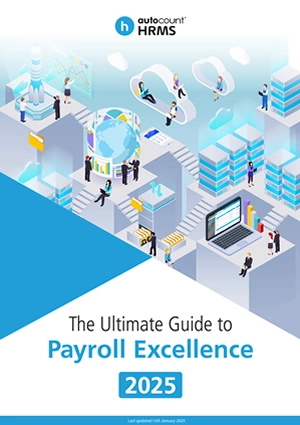
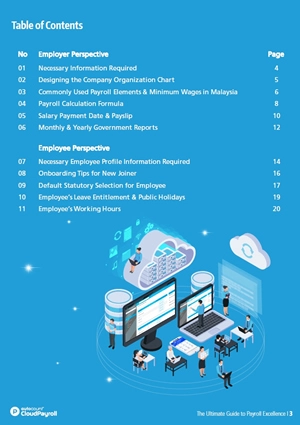
The Ultimate Guide to Payroll Excellence in Malaysia
Download our FREE comprehensive guide to managing payroll in Malaysia today! Dive into the latest statutory updates and regulations for 2025.
Don’t miss out – download your copy now!
What’s Next?
Mega Cloud Software & Tech provides Accounting, POS, Payroll, IT Services, and HRD-claimable training, empowering businesses in Malaysia with smart, compliant, and future-ready digital solutions.